Learn how to deploy n8n with Docker, PostgreSQL 17, and Nginx on AlmaLinux 10. Secure the setup with HTTPS and run n8n automation workflows in production.
Introduction
Automation platforms are becoming a core part of modern infrastructure. n8n is an open-source workflow automation tool that allows teams to connect APIs, automate tasks, and build powerful integrations without maintaining complex backend logic.
Deploying n8n in production requires more than simply starting a container. A stable deployment includes:
- Docker for isolated runtime
- Persistent storage
- Reverse proxy using Nginx
- HTTPS encryption
- Proper environment configuration
In this guide, we deploy n8n using Docker and Nginx on AlmaLinux 10 in a secure and maintainable setup suitable for production environments.
Step 1 - Update the AlmaLinux Server
Keeping the system updated ensures security patches and stable dependencies.
sudo dnf update -y
Install required system utilities.
sudo dnf install curl git firewalld -y
Enable the firewall service.
sudo systemctl enable --now firewalld
Step 2 - Install Docker Engine
Install the official Docker repository.
sudo dnf config-manager --add-repo https://download.docker.com/linux/centos/docker-ce.repo
Install Docker packages.
sudo dnf install docker-ce docker-ce-cli containerd.io docker-buildx-plugin docker-compose-plugin -y
Start and enable Docker.
sudo systemctl enable --now docker
Verify Docker installation.
docker --version
Step 3 - Create n8n Deployment Directory
Organizing deployment files improves maintenance and backups.
mkdir -p ~/n8n-docker && cd ~/n8n-docker
Create persistent storage directories.
mkdir n8n_data
mkdir postgres_data
These directories store workflow data and the PostgreSQL database.
Step 4 - Create Docker Compose Configuration
Create the Docker Compose file.
nano docker-compose.yml
Add the following configuration.
services:
  postgres:
    image: postgres:17
    container_name: n8n_postgres
    restart: always
    environment:
      POSTGRES_USER: n8n
      POSTGRES_PASSWORD: strongpassword
      POSTGRES_DB: n8n
    volumes:
      - ./postgres_data:/var/lib/postgresql/data

  n8n:
    image: n8nio/n8n:latest
    container_name: n8n
    restart: always
    depends_on:
      - postgres
    ports:
      - "5678:5678"
    environment:
      - DB_TYPE=postgresdb
      - DB_POSTGRESDB_HOST=postgres
      - DB_POSTGRESDB_PORT=5432
      - DB_POSTGRESDB_DATABASE=n8n
      - DB_POSTGRESDB_USER=n8n
      - DB_POSTGRESDB_PASSWORD=strongpassword
      - N8N_HOST=n8n.example.com
      - N8N_PORT=5678
      - N8N_PROTOCOL=https
      - WEBHOOK_URL=https://n8n.example.com/
      - NODE_ENV=production
      - GENERIC_TIMEZONE=Asia/Kolkata
    volumes:
      - ./n8n_data:/home/node/.n8n
Replace:
n8n.example.com
with the domain used for the deployment.
Step 5 - Fix Directory Permissions
n8n containers run using the node user (UID 1000). Set proper permissions for persistent storage.
sudo chown -R 1000:1000 n8n_data
Step 6 - Allow Docker Access Through SELinux (If enabled)
AlmaLinux enables SELinux by default, which may block container access to mounted volumes.
sudo setsebool -P httpd_can_network_connect 1
Step 7 - Start the n8n Stack
Start containers using Docker Compose.
docker compose up -d
Verify running containers.
docker ps
Next we configure Nginx to expose the service through a domain.
Step 8 - Install Nginx
Install the Nginx web server.
sudo dnf install nginx -y
Start and enable the service.
sudo systemctl enable --now nginx
Step 9 - Configure Nginx Reverse Proxy
Create a new Nginx configuration file.
sudo nano /etc/nginx/conf.d/n8n.conf
Add the following configuration.
server {
    listen 80;
    server_name n8n.example.com;

    location / {
        proxy_pass http://127.0.0.1:5678;
        proxy_http_version 1.1;

        proxy_set_header Upgrade $http_upgrade;
        proxy_set_header Connection 'upgrade';

        proxy_set_header Host $host;
        proxy_cache_bypass $http_upgrade;

        proxy_set_header X-Real-IP $remote_addr;
        proxy_set_header X-Forwarded-For $proxy_add_x_forwarded_for;
    }
}
Test the configuration.
sudo nginx -t
Reload Nginx.
sudo systemctl reload nginx
Step 10 - Configure Firewall Rules
Allow HTTP and HTTPS traffic through the firewall.
sudo firewall-cmd --permanent --add-service=http
sudo firewall-cmd --permanent --add-service=https
sudo firewall-cmd --reload
Step 11 - Install HTTPS Certificate
Install Certbot for SSL certificates.
sudo dnf install certbot python3-certbot-nginx -y
Generate the SSL certificate.
sudo certbot --nginx -d n8n.example.com
Certbot automatically configures HTTPS and secure redirects.
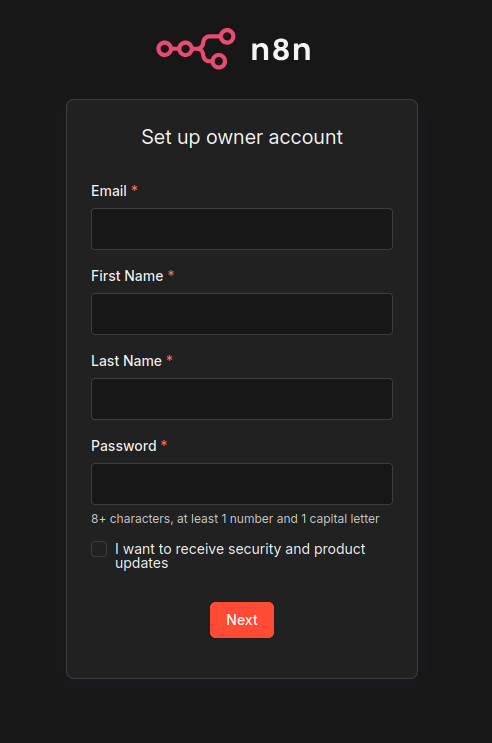
After installation, n8n becomes accessible through:
https://n8n.example.com
Troubleshooting
If you get error in browser, check Docker logs
docker logs n8n
docker logs n8n_postgres
If you have enabled SELinux, try to disable it by
setenforce 0
And check browser by refreshing page.
Operational Tips for Production Stability
Professional deployments benefit from a few operational practices:
Regular container updates
docker compose pull
docker compose up -d
Check container logs
docker logs -f n8n
Backup workflow data
The directory
~/n8n-docker/n8n_data
~/n8n-docker/postgres_data
contains all automation workflows and credentials and should be included in regular server backups.
Conclusion
n8n provides a powerful automation platform capable of replacing many proprietary workflow tools. When deployed with Docker and Nginx on AlmaLinux 10, the platform becomes reliable, scalable, and secure for production use.
This architecture ensures:
- containerized deployment with Docker
- persistent workflow storage
- secure HTTPS communication
- reverse proxy routing through Nginx
Such a setup allows teams to build automation pipelines while maintaining operational stability on modern Linux infrastructure.